MD
PDFtoMarkdown
Workspace Integration

Convert PDF to Notion Markdown Pages

Transform static PDF manuals, meeting agendas, and tables into editable Notion pages with checklists, callouts, and simple tables.

100% In-Browser Private
5 min read
Updated September 2026

Notion Markdown Conversion Engine

100% In-Browser Conversion — Your Files Are Never Uploaded

Drag & Drop your PDF document here

or browse files on your device

⚡ No file size limit 🔒 100% Private
Markdown Output
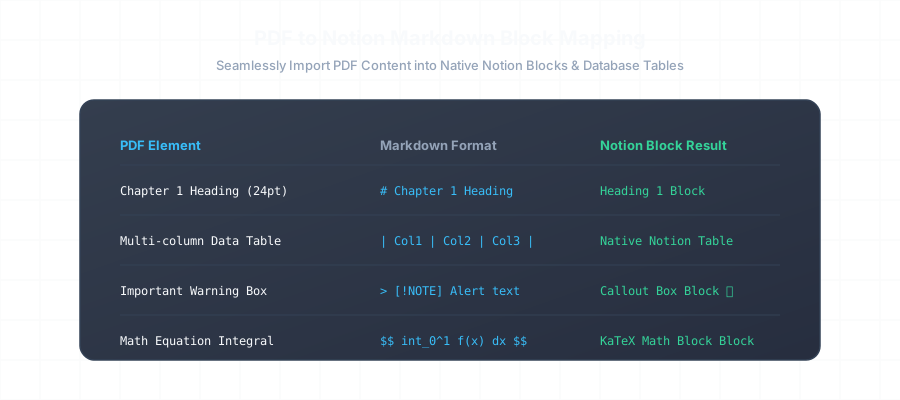
PDF to Notion Markdown Block Mapping Diagram

Before vs. After: Ready for Notion Block Import

See how flat PDF bullet points and notes transform into rich, interactive Notion blocks:

Flat PDF Text Extract
Broken Layout
Project Alpha Timeline & Milestones
- Phase 1 Architecture (Done)
- Phase 2 Backend Deployment (In Progress)
- Phase 3 Security Audit (Pending)
Note: Requires SOC2 Type II compliance check before release.
Notion Markdown Format
Valid CommonMark
# Project Alpha Timeline & Milestones

- [x] **Phase 1:** Core Architecture & Schema Finalization
- [ ] **Phase 2:** Cloudflare Edge & WASM Pipeline Deployment
- [ ] **Phase 3:** Third-Party SOC2 Type II Security Audit

> 💡 **Compliance Note:**
> All client data must remain sandboxed on-device. Zero cloud uploads allowed.

| Milestone | Target Date | Lead Owner | Status |
| :-------- | :---------- | :--------- | :----- |
| Alpha Release | Oct 15 | Engineering | Complete |
| Public Launch | Nov 01 | Product | In Progress |

Why Notion Markdown Import is Superior to PDF Attachments

Uploading a raw PDF attachment into Notion makes its content invisible to Notion AI and global workspace search. By converting your PDFs into native Markdown prior to importing, every sentence, task item, and table cell becomes fully searchable, collaborative, and editable.

Frequently Asked Questions

Everything you need to know about format extraction, privacy, and markdown compatibility.

How do I import the converted Markdown file into Notion?

Open your Notion workspace, navigate to any page, click the '...' menu in the top-right corner, select 'Import', and choose 'HTML & Markdown'. Select the downloaded `.md` file. Notion will automatically convert the text into native Notion blocks, headings, checklists, and database tables.

Can I paste the converted Markdown directly into a Notion page?

Yes! Simply copy the output from the converter tool and press Cmd+V (macOS) or Ctrl+V (Windows) directly into an empty Notion page. Notion's real-time parser immediately transforms markdown syntax into interactive blocks.

How are PDF tables handled when imported into Notion?

GFM pipe tables are imported as native Notion Simple Tables. You can easily toggle 'Header row' or 'Header column' in Notion, or convert the table into a full Notion Database with properties and custom views.

Does it support Notion callout blocks and toggle lists?

Yes. Blockquotes (`> ...`) and standard bullet points are translated into Notion Callout blocks and Toggle lists respectively during import.

Related Conversion Guides & Workflows

Explore dedicated documentation for other document formats and developer pipelines.