MD
PDFtoMarkdown
Head-to-Head Comparison

pdftomarkdownconverter.net vs. Pandoc

Why developers, researchers, and data engineers switch from Pandoc CLI to our in-browser WebAssembly engine for table preservation and math fidelity.

100% In-Browser Private
6 min read
Updated September 2026

Try the In-Browser Engine (No Install Needed)

100% In-Browser Conversion — Your Files Are Never Uploaded

Drag & Drop your PDF document here

or browse files on your device

⚡ No file size limit 🔒 100% Private
Markdown Output
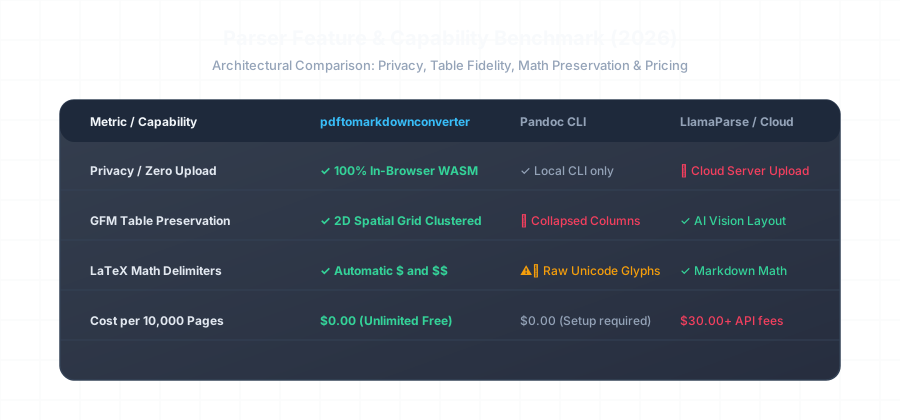
Feature and Capability Benchmark Matrix comparing pdftomarkdownconverter vs Pandoc and Cloud Parsers

Table Extraction Fidelity: Pandoc vs. pdftomarkdownconverter

See how Pandoc's linear extraction breaks financial and technical table columns compared to our 2D spatial AST engine:

Pandoc Output (Collapsed Columns)
Broken Layout
# Pandoc CLI Output (pdftotext intermediary)
Quarterly Financials Q1 2025 Q2 2025 YoY Growth Enterprise ARR $42.5M $58.1M +36.7% Mid-Market ARR $18.2M $24.5M +34.6%
(Table borders lost, column channels collapsed)
pdftomarkdownconverter (Clean GFM Pipe Table)
Valid CommonMark
## Quarterly Financials

| Revenue Segment | Q1 2025 | Q2 2025 | YoY Growth |
| :-------------- | ------: | ------: | ---------: |
| Enterprise ARR  | $42.5M  | $58.1M  | +36.7%     |
| Mid-Market ARR  | $18.2M  | $24.5M  | +34.6%     |

*Clean GFM pipe table generated with full 2D spatial alignment.*

Feature Comparison Matrix

Feature / Metric pdftomarkdownconverter.net Pandoc CLI
GFM Pipe Tables ✓ Native 2D Spatial Sorting ❌ Frequently Broken / Collapsed
LaTeX Math Delimiters ✓ Auto $ and $$ Delimiters ⚠️ Raw Disjointed Unicode Glyphs
Installation Requirement ✓ Zero Install (100% In-Browser WASM) ❌ Requires Haskell / Poppler / CLI
2-Column Layout Reading Order ✓ Automated De-Interleaving ❌ Jumbles Left and Right Columns
Data Privacy ✓ 100% Local Device Memory ✓ Local CLI Execution

Frequently Asked Questions

Everything you need to know about format extraction, privacy, and markdown compatibility.

Why does Pandoc struggle with PDF-to-Markdown conversion?

Pandoc is an AST-to-AST document compiler designed for structured text formats (Markdown, LaTeX, DOCX, HTML). When converting PDFs, Pandoc cannot parse PDF vector coordinate streams natively; it delegates to external utilities like `pdftotext`, which flatten 2D spatial coordinates into unstructured text streams, breaking tables and math formulas.

Do I need to install Haskell or CLI packages to use pdftomarkdownconverter.net?

No. While Pandoc requires a local CLI installation, Haskell runtime packages, and Poppler dependencies, our tool runs 100% inside your browser using WebAssembly. There is zero installation, zero package management, and zero environment setup required.

How does mathematical equation conversion compare between the two?

Pandoc dumps PDF math as disconnected Unicode symbols or raw strings. Our engine reconstructs mathematical ASTs into standard KaTeX/MathJax delimiters (`$...$` and `$$...$$`).

Can I use pdftomarkdownconverter as a drop-in Pandoc replacement in scripts?

Yes! Our standalone CLI tool (`pdftomarkdown input.pdf -o output.md`) provides a drop-in command-line alternative that produces significantly cleaner GFM Markdown than Pandoc.

Related Conversion Guides & Workflows

Explore dedicated documentation for other document formats and developer pipelines.