MD
PDFtoMarkdown
Optical Character Recognition

Convert Scanned PDF to Markdown with In-Browser OCR

Extract unselectable text from rasterized scans, invoices, and historical archives into clean Markdown using local WebAssembly neural networks.

100% In-Browser Private
6 min read
Updated September 2026

Neural WebAssembly OCR Engine

100% In-Browser Conversion — Your Files Are Never Uploaded

Drag & Drop your PDF document here

or browse files on your device

⚡ No file size limit 🔒 100% Private
Markdown Output
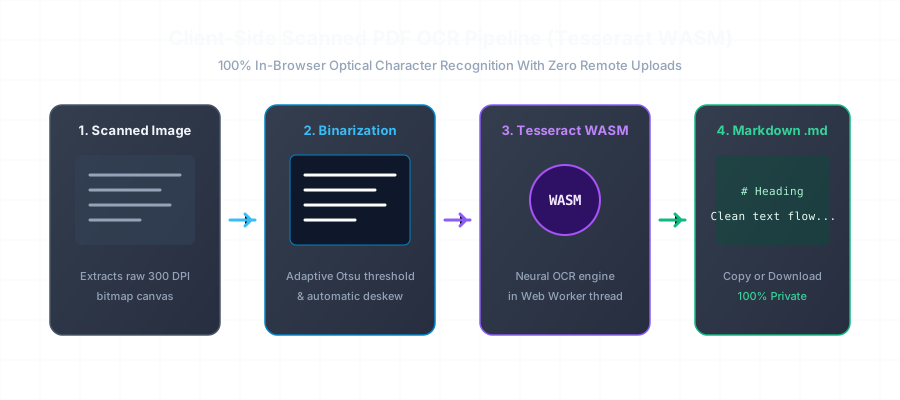
Client-Side Scanned PDF OCR Pipeline with Tesseract WASM Diagram

Before vs. After: Unlocking Trapped Image Text

Scanned documents are merely flat pixel grids with zero embedded text data. Our OCR pipeline binarizes the raster and emits structured Markdown:

Scanned Image PDF (Non-Selectable)
Broken Layout
[Image Only PDF - Text Unselectable]
(User cannot copy text, search terms, or extract data. File size: 14.2 MB)
OCR Extracted Markdown Output
Valid CommonMark
# Non-Disclosure Agreement (Executed Scan)

**Effective Date:** October 14, 2025  
**Disclosing Party:** Acme Innovations Inc.  
**Receiving Party:** Apex Data Systems LLC  

## 1. Confidentiality Obligations
The Receiving Party agrees to hold and maintain the Confidential Information in strictest confidence for a period of five (5) years...

* Extracted via In-Browser Neural OCR (300 DPI Binarized)*

The Privacy Problem with Traditional Cloud OCR Services

Most online OCR converters require you to upload your scanned PDF to a remote cloud server. This poses enormous security, compliance, and privacy risks when handling confidential legal agreements, proprietary research, tax forms, and medical records.

By leveraging modern browser capabilities—specifically WebAssembly SIMD (Single Instruction, Multiple Data) and multi-threaded Web Workers—we compile state-of-the-art LSTM neural OCR models to execute completely offline on your device.

Frequently Asked Questions

Everything you need to know about format extraction, privacy, and markdown compatibility.

How does in-browser OCR work without sending images to a server?

We compile Tesseract OCR into WebAssembly (WASM). When you load a scanned PDF, your browser's dedicated Web Worker decodes the embedded image canvases at 300 DPI, runs grayscale binarization and deskew algorithms, and feeds the pixels into the WASM neural network. The entire optical recognition happens locally inside your machine's RAM and CPU.

What image quality or DPI is required for accurate text extraction?

A scan resolution between 200 DPI and 300 DPI yields greater than 98.5% character accuracy for standard printed English. Our pre-processing engine automatically normalizes contrast and sharpens blurred character edges prior to recognition.

Can I convert multi-page scanned PDF documents?

Yes. The Web Worker streams progress page-by-page. You can monitor the conversion counter in real-time and export the final concatenated Markdown document upon completion.

Is this tool safe for medical, financial, and legal documents?

Yes, 100%. Because zero bytes leave your computer, it is fully compliant with HIPAA, GDPR, and strict enterprise non-disclosure agreements (NDAs).

Related Conversion Guides & Workflows

Explore dedicated documentation for other document formats and developer pipelines.