MD
PDFtoMarkdown
Specification & Architecture

What is GitHub Flavored Markdown (GFM)?

A complete technical guide to the GFM specification, its extensions beyond CommonMark, and why it is the global standard for technical documentation.

100% In-Browser Private
6 min read
Updated September 2026

Convert Your PDF into Strict GFM Markdown

100% In-Browser Conversion — Your Files Are Never Uploaded

Drag & Drop your PDF document here

or browse files on your device

⚡ No file size limit 🔒 100% Private
Markdown Output
GitHub Flavored Markdown GFM Syntax and Table Structure Diagram

CommonMark vs. GitHub Flavored Markdown (GFM)

See the expressive additions GFM brings to standard Markdown:

Standard CommonMark (No Table Spec)
Broken Layout
Standard CommonMark lacks native syntax for:
- Pipe tables
- Interactive task lists
- Strikethrough text
- Direct issue references
GitHub Flavored Markdown (GFM)
Valid CommonMark
# GitHub Flavored Markdown (GFM) Features

| Feature | GFM Syntax | Rendered Example |
| :------ | :--------- | :--------------- |
| Tables  | `| a | b |`  | Pipe grid table  |
| Tasks   | `- [x] Done`| Interactive box  |
| Strike  | `~~text~~`  | ~~Strikethrough~~|

- [x] Complete GFM Specification compliance
- [ ] Explore extended autolinks (https://github.com)

Core Extensions Introduced by GFM

John Gruber originally created Markdown in 2004 as a simple text-to-HTML markup syntax. However, the original syntax lacked formal specifications for technical documentation structures like tables and task checklists. The GFM specification formalizes these essential extensions:

Frequently Asked Questions

Everything you need to know about format extraction, privacy, and markdown compatibility.

What is GitHub Flavored Markdown (GFM)?

GitHub Flavored Markdown (GFM) is a strict formal superset of CommonMark created by GitHub. While CommonMark defines core Markdown elements (headings, bold, lists, quotes, links), GFM standardizes essential modern documentation syntax—most notably pipe tables, task checklists, strikethrough, autolinks, and fenced code blocks with language tags.

Why is GFM the default output format for this PDF converter?

Because GFM is supported by almost all modern developer tools, note-taking applications (Obsidian, Notion, Logseq, Joplin), static site generators (Astro, Docusaurus, Next.js), and AI frameworks. Emitting GFM guarantees maximum compatibility across your entire software and knowledge stack.

How are tables formatted in GFM?

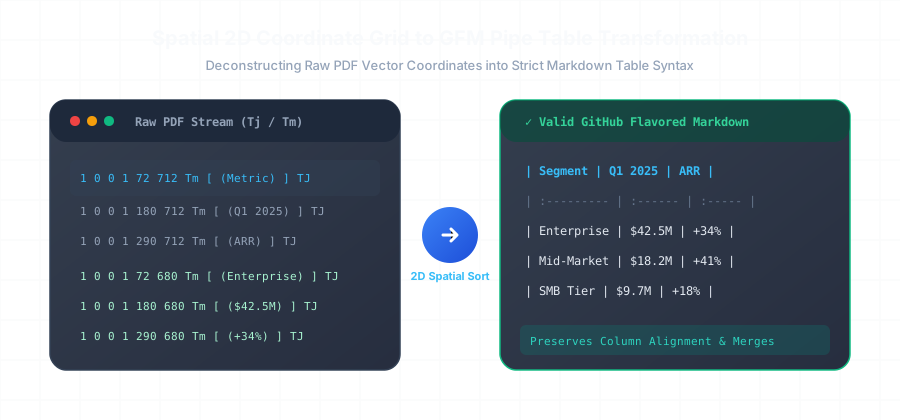
GFM tables use vertical pipes (`|`) to delineate columns and hyphens (`---`) with optional colons (`:---`, `:---:`, `---:`) in the separator row to specify left, center, or right column text alignment.

Is GFM supported by LLMs and vector databases?

Yes. Major frontier LLMs (GPT-4o, Claude 3.5, Gemini 1.5) are trained heavily on GFM source code from GitHub repositories, making them exceptionally proficient at parsing and reasoning over GFM tables and code blocks.

Related Conversion Guides & Workflows

Explore dedicated documentation for other document formats and developer pipelines.