MD
PDFtoMarkdown
LangChain Integration

Convert PDF to LangChain Document Chunks

Transform unstructured PDF files into semantically enriched LangChain Document objects with attached header lineage and intact GFM tables.

100% In-Browser Private
6 min read
Updated September 2026

LangChain Document Conversion Engine

100% In-Browser Conversion — Your Files Are Never Uploaded

Drag & Drop your PDF document here

or browse files on your device

⚡ No file size limit 🔒 100% Private
Markdown Output
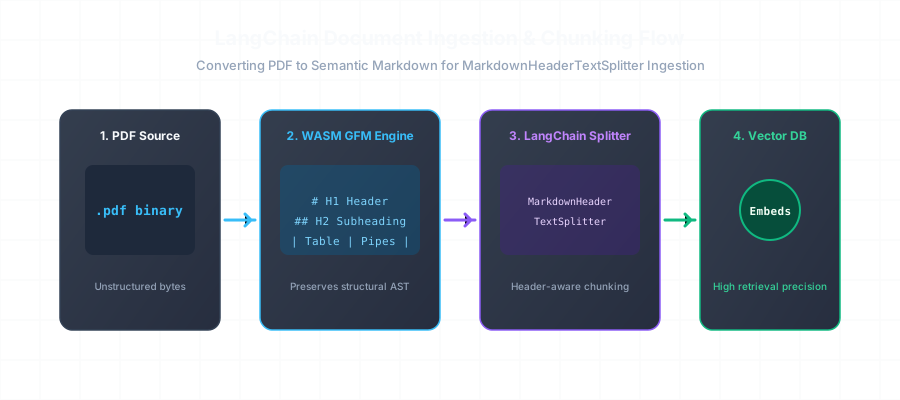
LangChain Document Ingestion and Header Splitting Flow Diagram

PyPDFLoader vs. MarkdownHeaderTextSplitter

Compare a flat unstructured PyPDFLoader chunk against an enriched Markdown header chunk:

PyPDFLoader Flattened String
Broken Layout
# Standard PyPDFLoader Output (Flattened string)
page_content="Annual Report 2025 Segment Revenue Enterprise 42.5M Consumer 18.2M ..."
metadata={'source': 'annual_report.pdf', 'page': 1}
MarkdownHeaderTextSplitter Chunk
Valid CommonMark
# MarkdownHeaderTextSplitter Output (Semantic Chunk with Header Lineage)
Document(
  page_content="| Segment | Q1 2025 | YoY |\n| Enterprise | $42.5M | +34% |\n| Consumer | $18.2M | +18% |",
  metadata={
    'Header 1': 'Financial Review 2025',
    'Header 2': 'Quarterly Segment Revenue',
    'source': 'annual_report.pdf',
    'format': 'GFM_Table'
  }
)

Python Integration Example for LangChain Pipelines

Here is how you can implement end-to-end PDF-to-Markdown ingestion in your LangChain RAG pipeline:

from langchain_text_splitters import MarkdownHeaderTextSplitter
import pdftomarkdown

# 1. Convert PDF to high-fidelity Markdown
markdown_text = pdftomarkdown.convert("whitepaper.pdf", extract_tables=True)

# 2. Define semantic header split points
headers_to_split_on = [
    ("#", "Header 1"),
    ("##", "Header 2"),
    ("###", "Header 3"),
]

markdown_splitter = MarkdownHeaderTextSplitter(
    headers_to_split_on=headers_to_split_on, 
    strip_headers=False
)

# 3. Create LangChain Document objects with attached metadata
docs = markdown_splitter.split_text(markdown_text)
print(f"Generated {len(docs)} high-precision semantic chunks!")

Frequently Asked Questions

Everything you need to know about format extraction, privacy, and markdown compatibility.

Why should I convert PDFs to Markdown before loading into LangChain?

LangChain's default PyPDFLoader extracts raw strings without layout awareness, causing tables to collapse and headers to be lost. By converting to Markdown first, you can use LangChain's `MarkdownHeaderTextSplitter` to retain rich hierarchical metadata (Header 1, Header 2, Header 3) attached directly to each vector chunk, dramatically improving RAG retrieval relevance.

How do I split Markdown in LangChain by headers?

You define `headers_to_split_on = [('#', 'Header 1'), ('##', 'Header 2'), ('###', 'Header 3')]` and pass your converted markdown text into `MarkdownHeaderTextSplitter.split_text(markdown_content)`. This produces a list of LangChain `Document` objects with automatic metadata tagging.

Can I automate this in Python with your SDK?

Yes. Use `pip install pdftomarkdown-rs` to convert PDFs directly to Markdown strings inside your Python LangChain pipeline before passing them into your splitter.

Does this handle multi-page PDF documents?

Yes. The converter concatenates pages seamlessly while eliminating repetitive running headers and footers that clutter vector search indexes.

Related Conversion Guides & Workflows

Explore dedicated documentation for other document formats and developer pipelines.