MD
PDFtoMarkdown
Workflow Comparison

pdftomarkdownconverter.net vs. Adobe Acrobat Pro

Why teams replace Adobe Acrobat's tedious multi-step DOCX export workflow with direct, 1-click in-browser Markdown conversion.

100% In-Browser Private
5 min read
Updated September 2026

Convert Your PDF Directly to Markdown

100% In-Browser Conversion — Your Files Are Never Uploaded

Drag & Drop your PDF document here

or browse files on your device

⚡ No file size limit 🔒 100% Private
Markdown Output
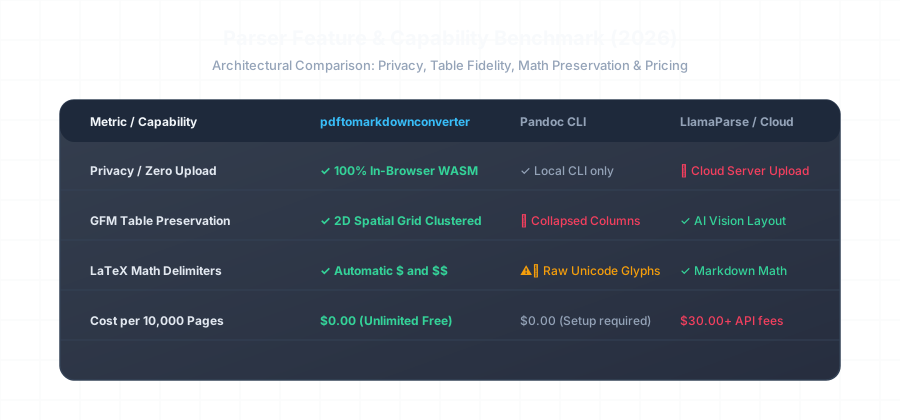
Comparison benchmark between pdftomarkdownconverter and Adobe Acrobat

Feature & Workflow Comparison

Comparison Dimension pdftomarkdownconverter.net Adobe Acrobat Pro
Direct Markdown Export ✓ Direct 1-Click .md Export ❌ None (Requires DOCX intermediary)
Annual Cost $0.00 (100% Free Forever) \$239.88 / year per user
File Privacy & Security ✓ 100% Local WASM (Zero Cloud) ⚠️ Uploaded to Adobe Document Cloud
KaTeX Math Preservation ✓ Automatic $ and $$ Delimiters ❌ Mangled Word Equation Objects

Frequently Asked Questions

Everything you need to know about format extraction, privacy, and markdown compatibility.

Does Adobe Acrobat Pro have a direct export to Markdown option?

No. Adobe Acrobat Pro only supports exports to DOCX, XLSX, PPTX, and HTML. To get Markdown from Adobe, users must export to Word, open Word, save as text, and run a secondary converter, which frequently introduces formatting artifacts and breaks math formulas.

How does pricing compare between the two tools?

Adobe Acrobat Pro costs $239.88 per year per user on an annual subscription. pdftomarkdownconverter.net is 100% free, unlimited, and requires zero account sign-up or credit card.

Is Adobe Acrobat's cloud export safe for confidential company data?

Adobe Acrobat's online export features upload your PDF files to Adobe Document Cloud servers for processing. In contrast, pdftomarkdownconverter.net executes 100% on your local machine via WebAssembly, guaranteeing zero third-party cloud data exposure.

How do table and code block extractions compare?

Adobe's DOCX export creates complex XML tables that result in bloated HTML when converted. Our tool directly synthesizes clean GitHub Flavored Markdown pipe tables and fenced code blocks in one click.

Related Conversion Guides & Workflows

Explore dedicated documentation for other document formats and developer pipelines.