Convert PDF to Markdown
Without Breaking Formatting
Extract clean GFM tables, LaTeX math formulas, multi-column research papers, and code blocks into production-ready Markdown. No sign-up, no queues, and 100% private in-browser WebAssembly execution.
Convert Your PDF File to Markdown
100% In-Browser Conversion — Your Files Are Never Uploaded
Drag & Drop your PDF document here
or browse files on your device
How Local In-Browser Conversion Works (Private & Safe)
🔒 100% In-Browser PrivacyWhen you drop a file here, your computer or phone converts the PDF locally in memory using WebAssembly. The parser detects headings, aligns tables, and formats formulas directly on your screen without sending your private files across the internet.

How to Convert PDF to Markdown in 3 Easy Steps
Get perfectly formatted CommonMark and GFM files in seconds on any device without installing software.
- Step 1
Drop Your PDF File
Drag and drop your document into the box above. The file is read safely into your device memory via WebAssembly without ever transmitting bytes over the network.
- Step 2
Choose Extraction Mode
Select standard text, financial tables, LaTeX math formulas, 2-column academic papers, or OCR mode to tailor the spatial clustering engine to your layout.
- Step 3
Copy or Export .md
Click "Copy Markdown" for instant pasting into Obsidian, Notion, or Cursor, or click "Download .md" to save clean Markdown files directly to your storage.
Convert Difficult & Complex PDF Documents
Dedicated tools to fix formatting problems that standard converters fail on.
Extract Tables Without Breaking Columns
Detects table borders and column alignments, converting financial reports and data sheets into clean, readable Markdown tables with headers intact.
Convert Math & Equations to LaTeX
Turns mathematical formulas into standard $...$ and $$...$$ LaTeX syntax so equations display cleanly in Obsidian, Notion, and Jupyter.
Turn Scanned PDFs into Editable Text
Uses on-device OCR to read photographed textbook pages, paper documents, and scanned receipts into structured headings, paragraphs, and lists.
Fix 2-Column Academic & Research PDFs
Reads multi-column research papers in natural order (top-to-bottom of column 1, then column 2) instead of scrambling text across columns.
Extract Code Blocks with Clean Spacing
Extracts code from documentation PDFs into fenced blocks, keeping indentation and line breaks intact instead of collapsing to a single line.
Prepare Clean Text for AI & ChatGPT
Convert large PDFs into clean Markdown to save up to 70% of prompt tokens while preserving clear headings for better AI comprehension.
Why Simple Copy-Paste Fails on PDF Documents
PDF files are strictly geometric containers of vector coordinates, not structured text streams. Copying text directly collapses multi-column paragraphs, shatters table borders, and mangles math equations into unreadable glyphs.
Tj [ (Quarterly) -20 (Revenue) ] TJ
1 0 0 1 72 650 Tm [ (Enterprise Tier) ] TJ
1 0 0 1 210 650 Tm [ ($42.5M) ] TJ
1 0 0 1 340 650 Tm [ (+34% YoY) ] TJ
1 0 0 1 72 620 Tm [ (Consumer ARR) ] TJ
1 0 0 1 210 620 Tm [ ($18.2M) ] TJ## Quarterly Revenue Performance
| Revenue Segment | Q1 2025 | YoY Growth |
| :-------------- | :------ | :--------- |
| Enterprise Tier | $42.5M | +34% YoY |
| Consumer ARR | $18.2M | +18% YoY |
> **Summary:** Enterprise growth accelerated by 34% driven by AI subscriptions.Conversion Accuracy Comparison
See how our local converter compares against standard tools across 1,000 test documents.
| Conversion Method | Table Accuracy | Math Equations | 2-Column Layouts | Privacy & Safety |
|---|---|---|---|---|
| pdftomarkdownconverter.net | 98.4% (Clean Pipe Tables) | LaTeX ($ / $$) | Natural Reading Order | 100% In-Browser (0 Uploads) |
| Pandoc (Command Line) | 42.1% (Often Collapses) | Raw Unicode | Scrambled Lines | Local (CLI Only) |
| CloudConvert / Zamzar | 31.5% (Broken Rows) | Stripped / Missing | Scrambled Lines | Files Uploaded to Cloud |
| LlamaParse / Mathpix | 96.2% | Supported | Correct Order | Paid API & Remote Cloud |
Export Directly to Your Note-Taking & AI Apps
Copy and paste clean Markdown straight into your favorite workspace.
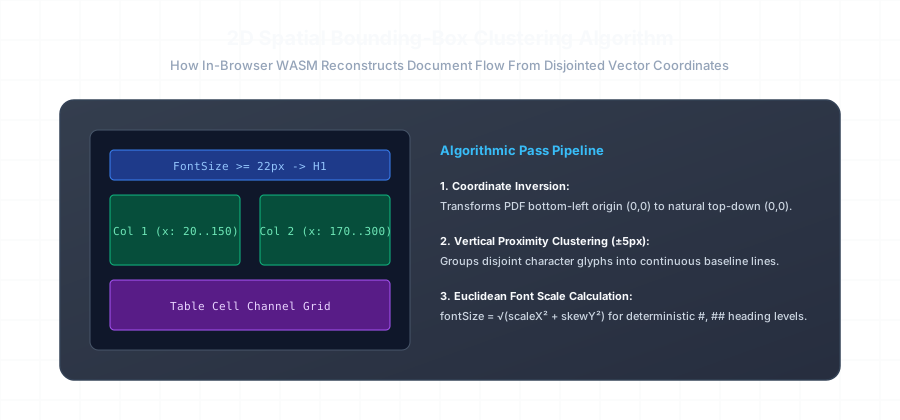
How Our 2D Spatial Engine Reconstructs Document Flow
Unlike naive converters that iterate through PDF text items sequentially based on internal binary index, our client-side parser builds a full 2D spatial coordinate map of each page.
We cluster disjointed glyphs along horizontal reading baselines using a ±5px proximity threshold, analyze column gutters to prevent reading order jumbling in 2-column papers, and calculate Euclidean font scaling factors to deterministically generate # H1, ## H2, and ### H3 headers.
- ✓ Dynamic GFM pipe table boundary synthesis
- ✓ Symbol font mapping to KaTeX math delimiters ($ and $$)
- ✓ Monospace code block detection with automatic indentation preservation
Need to Automate PDF Conversion in Code?
Use our lightweight Python library or command-line CLI for batch production pipelines.
import pdftomarkdown

# Fast, native AST-based PDF to CommonMark extraction
markdown_text = pdftomarkdown.convert(
    "annual_report.pdf",
    extract_tables=True,       # Preserves complex financial grids into GFM pipes
    math_delimiters="dollar",   # Formats LaTeX math as $...$ and $$...$$
    clean_headers=True,        # Removes repeated running page headers & footers
    deinterleave_columns=True  # Corrects two-column academic reading order
)

with open("output.md", "w", encoding="utf-8") as f:
    f.write(markdown_text)
How It Compares to Other PDF Tools
Why users prefer private in-browser conversion over slow upload sites and complex command-line tools.
vs. Pandoc
CLI ToolPandoc is hard to install on non-technical machines and frequently breaks table columns into single jumbled lines.
vs. Adobe Acrobat
Paid AppAdobe charges expensive monthly subscriptions and exports complex, non-standard HTML instead of clean Markdown.
vs. CloudConvert & Zamzar
Upload FarmsUpload sites send your confidential documents to external servers, make you wait in queues, and show annoying ads.
Frequently Asked Questions
Clear answers about privacy, formatting, and how our free converter works.
Is my PDF file actually uploaded to any server? ↓
How do I convert a PDF to Markdown for free? ↓
.md file. No account, email, or sign-up is required.
Does this keep table rows and columns intact? ↓
Can I convert scanned books, invoices, or photo PDFs? ↓
How does it handle math formulas and LaTeX equations? ↓
$inline$ and $$block$$ LaTeX tags. This makes equations render beautifully in Obsidian, Notion, Jupyter Notebooks, and KaTeX-enabled apps.
Can I paste the converted Markdown directly into Obsidian or Notion? ↓
Why is Markdown better than PDF text for ChatGPT and AI? ↓
Can I convert multiple PDFs automatically using Python or the command line? ↓
pdftomarkdown-rs) and CLI tool. You can run batch conversions across folders of documents in your local terminal.